Oracle Fusion User Connector
Connect Oracle Fusion Cloud Applications to Abacus.AI so that ChatLLM Teams chats with RouteLLM, the Abacus AI Agent and Custom Chatbots can read and write Fusion data — HCM (workers, absences, jobs, departments), Financials and Procurement (payables and receivables invoices, suppliers, purchase orders, journals, ledgers) and CX Sales (accounts, contacts, opportunities, leads) — through the Fusion REST API, under each user's own Oracle Fusion login and roles.
Setting up Oracle Fusion is a two-part process, for two different audiences:
| Part | Who does it | What it does | Page |
|---|---|---|---|
| 1. Administrator setup | An OCI IAM identity domain administrator together with an Abacus.AI workspace administrator | Creates a confidential application in your identity domain, grants it the Fusion Applications resource scope, and registers the credentials once as a config connector | Administrator setup |
| 2. Connect and use | Each end user | Signs in through your identity domain so the agent acts under that user's own Fusion login and roles | This page |
A config connector is required for the Oracle Fusion user connector to work. Every Oracle Fusion customer has its own OCI IAM identity domain and Fusion pod, so there is no shared Abacus.AI OAuth application to fall back on. Until an administrator completes Administrator setup, users have no application to authenticate against and connecting fails with "Oracle Fusion organization-level setup is incomplete".
Prerequisites
- Access to ChatLLM Teams
- An Oracle Fusion user account whose job and data roles grant access to the Fusion REST resources you want to query
- The Oracle Fusion config connector created in Administrator setup, Step 6
Scopes and permissions
The scopes requested when you sign in are built from the Fusion Scope your administrator entered on the config connector, plus openid and offline_access, which Abacus.AI always adds. offline_access is what makes OCI IAM issue a refresh token, so the connection can keep working without you signing in again every hour.
The Fusion Scope itself is customer-specific. It is the resource scope granted to the confidential application in your identity domain, and it usually looks like https://<pod>.fa.ocs.oraclecloud.com:443urn:opc:resource:consumer::all.
Beyond scopes, the connector can only read and write what your own Oracle Fusion job and data roles allow. A resource your roles do not cover returns HTTP 403 even though the connection itself is healthy.
Use Oracle Fusion in ChatLLM
Step 1 — Connect Oracle Fusion
In ChatLLM Teams, click the Connectors link on the home page, or click your profile in the top right and navigate to Profile → User Connectors.
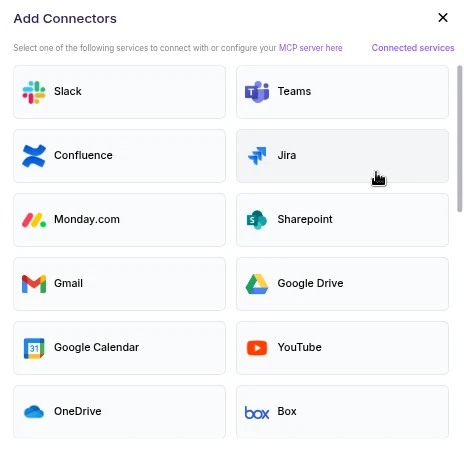
- Find Oracle Fusion in the list and click it.
- A browser pop-up opens on your organization's OCI IAM identity domain sign-in page. Sign in with the Oracle Fusion user whose roles cover the data you need.
- Review the requested access and click Allow.
- The pop-up closes and Oracle Fusion appears under your connected services, ready to use in chat.
The sign-in page is hosted on your organization's own OCI IAM identity domain, which comes from the Identity Domain URL on the config connector — not on Abacus.AI and not on a shared Oracle login page. If you are already signed in to that identity domain in the same browser, it may skip straight to the authorization prompt.
Step 2 — Chat with RouteLLM
- Open a new chat in ChatLLM Teams.
- From the model selector, choose RouteLLM (
route-llm). RouteLLM automatically routes each request to the most suitable underlying model, and is available for unlimited use to ChatLLM subscribers.
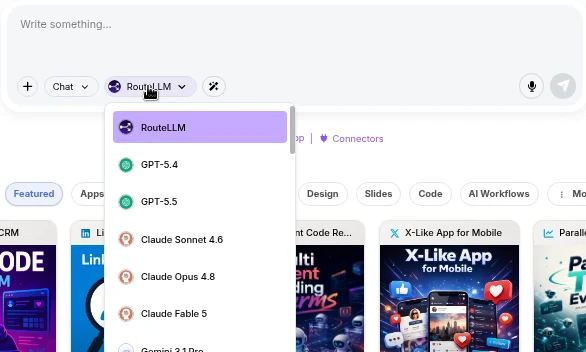
- Ask a question that references Oracle Fusion, for example "List the Oracle Fusion payables invoices created this month". RouteLLM invokes the Oracle Fusion tool, fetches the data under your identity, and responds in chat.
The first time you query a newly connected service in a chat, you may be prompted to authorize the connector. Complete the sign-in once and the request continues automatically; subsequent requests reuse the connection.
You don't need to train a Custom Chatbot to use Oracle Fusion with RouteLLM. Once the connector is configured in the User Connectors panel, it is immediately available across your workspace chats and to the Abacus AI Agent.
If you want a dedicated bot with its own instructions and a restricted set of tools, train a Custom Chatbot in the Developer Platform and, under Advanced Options → Tool Use, select Oracle_Fusion_Tool. You must also pick the Oracle Fusion config connector under **Config Connectors**; without it, the chatbot's users cannot connect to Oracle Fusion. End users of that chatbot are prompted to sign in to Oracle Fusion once, and the bot then acts under each user's own identity. See the Custom Chatbots guide for the full training and deployment walkthrough.
Supported Oracle Fusion tool actions
The Oracle Fusion user connector provides a thin REST wrapper that lets the AI agent call the Fusion REST API. The tool resolves your Fusion host from the connector, attaches the OAuth access token, and refreshes it automatically when it expires. You only provide the path after the Fusion URL.
Every path has the form <api>/resources/<version>/<resource>, where the version is 11.13.18.05 (or latest):
| API family | Path prefix | Resources |
|---|---|---|
| HCM | hcmRestApi/resources/11.13.18.05/ | workers, emps, absences, jobs, positions, grades, locations, departments, publicWorkers |
| Financials, Procurement and SCM | fscmRestApi/resources/11.13.18.05/ | invoices, payablesPayments, receivablesInvoices, suppliers, purchaseOrders, journalBatches, ledgersLOV, currenciesLOV, expenses, itemsV2 |
| CX Sales | crmRestApi/resources/11.13.18.05/ | accounts, contacts, opportunities, leads |
Some common calls:
| Operation | Endpoint | Method | Description |
|---|---|---|---|
| List workers | hcmRestApi/resources/11.13.18.05/workers | GET | List people with their names, assignments and work relationships |
| Get a worker | hcmRestApi/resources/11.13.18.05/workers/{id} | GET | Fetch a single worker |
| List absences | hcmRestApi/resources/11.13.18.05/absences | GET | List absence records |
| List payables invoices | fscmRestApi/resources/11.13.18.05/invoices | GET | List payables invoices |
| Create a payables invoice | fscmRestApi/resources/11.13.18.05/invoices | POST | Create a payables invoice from a JSON body |
| Update a supplier | fscmRestApi/resources/11.13.18.05/suppliers/{id} | PATCH | Update only the fields you send |
| List supplier sites | fscmRestApi/resources/11.13.18.05/suppliers/{id}/child/sites | GET | Read a child resource of a single record |
| List opportunities | crmRestApi/resources/11.13.18.05/opportunities | GET | List CX Sales opportunities |
| Discover a schema | fscmRestApi/resources/11.13.18.05/invoices/describe | GET | Return the attributes, finders and child resources of a resource |
Query parameters are passed through to Fusion: q to filter (for example LastName='Smith'), fields to limit the attributes returned, onlyData=true to drop the links blocks, limit and offset to page, totalResults=true for a count, orderBy to sort, expand to inline child resources, and finder for named finders. Collection responses carry items, count, hasMore, limit and offset, and the agent follows hasMore with offset to read the next page.
Writes use POST to create, PATCH to update and DELETE to remove. The application/vnd.oracle.adf.resourceitem+json content type is set automatically, and custom actions can override it with application/vnd.oracle.adf.action+json. Only the REST-Framework-Version, Effective-Of and Upsert-Mode request headers may be set; anything else is rejected.
Important notes
- Per-user identity: each user authenticates with their own Oracle Fusion login, so the agent is limited to that user's Fusion job and data roles.
- Your own OAuth application: the confidential application lives in your identity domain, so you control its grants, scope and lifetime. Abacus.AI never uses a shared Oracle app.
- Automatic token refresh: access tokens are valid for 1 hour and are refreshed automatically. OCI IAM may also rotate the refresh token during a refresh, and Abacus.AI persists the new value for you.
- Confirm before writing: the agent is instructed to confirm with you before it creates, updates or deletes a Fusion record.
- Pagination defaults: Fusion returns 25 records per page by default, up to a maximum of 500 per request.
- Large responses are truncated: a response over 200,000 characters comes back truncated with a note asking the agent to narrow it with
fields,onlyData=true,qor a smallerlimit. - Transient errors are retried: HTTP 429 and 5xx responses and network errors are retried with exponential backoff, honouring
Retry-After.
Troubleshooting
- "Oracle Fusion config-only setup requires the following fields: ...": one of Identity Domain URL, Fusion URL, Client ID, Client Secret or Fusion Scope is missing on the config connector. Re-open it and fill in every required field.
- "Oracle Fusion organization-level setup is incomplete": the config connector is missing or incomplete. Ask an administrator to complete Administrator setup.
- "A valid https URL on a
*.identity.oraclecloud.comhost is required": the Identity Domain URL is not an https URL on an.identity.oraclecloud.comhost. The equivalent message for the Fusion URL asks for an.oraclecloud.comhost. Enter the bare host with no path, port or credentials. - "Oracle Fusion did not return a refresh token": the Refresh token grant is not enabled on the confidential application, or
offline_accesswas stripped from its allowed scopes. See Administrator setup, Step 2. - "Could not complete the Oracle Fusion sign-in": the authorization code could not be exchanged at the identity domain. Usually the Client ID or Client Secret on the config connector no longer matches the confidential application, or the application is deactivated. Ask an administrator to check it.
- Invalid redirect URI on the sign-in page: the confidential application must list
https://abacus.ai/oauth/callbackexactly, with no trailing slash. - "No refresh token available" or "Failed to refresh the Oracle Fusion token": the refresh token expired or was revoked in the identity domain. Reconnect Oracle Fusion from Profile → User Connectors.
- "Oracle Fusion app credentials are missing from this connection. Please reconnect Oracle Fusion.": this connection predates a change to the config connector's credentials. Reconnect Oracle Fusion to pick up the current values.
- "Oracle Fusion is temporarily unavailable. Please try again later.": the identity domain returned a timeout, a rate limit or a 5xx. This is transient; try again shortly.
- HTTP 403 on a specific resource: your Fusion job or data roles do not cover that resource. Ask your Fusion administrator to grant the role that owns it, rather than trying other endpoints.
- "Unsupported headers: ...": the agent tried to set a header other than
REST-Framework-Version,Effective-OforUpsert-Mode. Only those three are allowed. - "Absolute URL must target the connected Fusion host": a full URL was passed that points somewhere other than your Fusion pod. Pass the path after the Fusion URL instead.